test import

Categories

Ad Home

Responsive Ads Here

Labels

642-813 SWITCH (2) 642-902 ROUTE (2) 643-832 TSHOOT (1) Access Based Enumeration (1) access list (2) AIX (1) Anti Malware (16) AutoIT (1) backtrack (4) Basic Networking (3) Blogspot (2) bootable USB (1) can not download attach file from gmail (1) ccna (9) CCNA Lab (19) centos (3) Check (1) Check_MK (3) cisco (51) Dell (1) DHCP (1) Download (2) Dynamic Host Configuration Protocol (1) ebook (2) Ebooks (18) eigrp (1) encapsulation (3) esxi5 (2) exam (13) exchange server 2010 (3) facebook (2) firewall-cmd (1) firewall-config (1) firewalld (1) Frame Relay (4) Free Router Simulator Softwares (1) FreeNAS (1) GhostSurf (1) gns3 (1) Hacking Security (5) hardware (1) hotspot (1) How to Change Windows 2008 R2 SID (1) How to create VPN network on Linux (1) How to install openSSH on AIX 5.3 (1) How to Install the Microsoft Core Fonts on Fedora 19 (1) HP (1) IBM (1) Infrastructure Monitoring (3) InterVLAN (1) ip routing (3) IPSec (2) ipv6 (1) IT (122) joomla (1) Kiến thức (278) LAN Technology (3) life skills for (1) lifeskills (2) linux (13) Linux-Unix (24) mac address (1) Magazine (9) Mail (2) mail server (1) MCSA (7) Microsoft (28) mikrotik (3) Multipoint (1) Nagios (3) NAT (1) nested (1) Network (1) Network Load Balancing (1) News (1) Nghệ thuật sống (1) O365 (4) Office 365 (4) OSPF (1) Packet tracer (19) Pass4sure (1) Point to Point (1) Point-to-Point Protocol (PPP) – CHAP (1) Point-to-Point Protocol (PPP) – PAP (1) Policy (3) Port Security (1) Practice Labs (19) Prerequisites (1) proxy (1) relax (7) rhel7 (1) RIP (1) routerOS (3) Routing (1) SAN (1) SAN Storage (1) Scripts (6) Server (1) server room (1) Sharepoint Server 2007 (1) Sharepoint Server 2010 (1) Spanning Tree Protocol (1) SSH login without password (1) Static Default Route (1) Storage (1) subnet (1) switch (1) System Requirements for Windows Server 2012 (1) Tản mạn (2) tcp-ip (1) telnet (1) TestInside (1) Thư giãn (4) Thủ thuật (2) tip (3) Tips + Tricks (29) trick (1) Tutorial (29) Tutorialvirtual server HighAvailability (1) ubuntu (4) unix (3) Unix-Linux (8) usb (1) Virtual Private Network (VPN) - IPsec (Site-to-Site) (1) Virtual Trunking Protocol (1) Virtualization (2) Virtualization HighAvailability (1) virus (5) vmware (6) vpn (4) vpn client (1) vpn client to site (2) vpn site to site (2) vSphere 5 (6) vSphere 5.1 (1) WAN Technology (13) Warranty (1) wildcard mask (1) windows 7 (1) windows 8 (1) windows server 2008 (3) Windows Server 8 (1)

Facebook

Ethereum

Subscribe for New Post Notifications

Ripple

Ethereum Price

Monday Tuesday Wednesday
$402.89 $384.06 $396.34

Contact Form

Name

Email *

Message *

Bitcoin

Litecoin

Browsing Category " MCSA "

Exam 70-291 & Simulation Videos

On exam
Tiếp tục cuộc hành trình lấy MCSA với 1000 điểm cho mỗi môn. grin

Môn 70-291 này có 4 sim nhưng chủ yếu đề thi ra sim MX Record ( tốt nhất là nên học hết cả 4 sim.)

Đề thi cập nhậ́t mới nhất, các bạn chỉ cần tập trung học & thi lấy bằng!cool


Nếu có gì thắc mắc, các bạn cứ comment tại đây.Tôi sẽ cố gắng trả lời trong vòng 24h.

Exam 70-290 & Simulation Videos

On exam
Trong 4 môn thi MCSA thì môn 290 này nặng nhất.grin

Môn này các bạn nên học theo bộ đề Testinside 176 câu + 7 sim cung cấp tại đây.

Exam 70-290-Testinside-176Qs


Simulation Videos: có 7 câu sim (đề thi thường ra sim 1, 3, 5 ,7) tốt nhất là các bạn nên học hết 7 câu.

Chúc các bạn may mắn & đạt được 1000 điểm!grin
Hoàn thành môn này là có MCSA rồi đó.

Exam 70-291 & Simulation Videos

On exam
Tiếp tục cuộc hành trình lấy MCSA với 1000 điểm cho mỗi môn. grin

Môn 70-291 này có 4 sim nhưng chủ yếu đề thi ra sim MX Record ( tốt nhất là nên học hết cả 4 sim.)

Đề thi cập nhậ́t mới nhất, các bạn chỉ cần tập trung học & thi lấy bằng!cool

Nếu có gì thắc mắc, các bạn cứ comment tại đây.Tôi sẽ cố gắng trả lời trong vòng 24h.
Copyright by http://www.lecuong.info

Exam 70-351

Đọc lại bài "Chiến lược thi các môn Microsoft"

Môn 351 này là ISA 2006, đề thi gồm 60 câu, không có sim.Các bạn luyện theo bộ đề thi 87 câu bên dưới là bảo đảm pass!Nếu học kỹ có thể pass được 1000.grin


Các bộ đề thi được cung cấp tại www.lecuong.info luôn luôn được cập nhất mới nhất & chính xác nhất.Chúc các bạn may mắn.cool

Exam 70-620

Thực hiện lời hứa với một số anh em, bắt đầu từ hôm nay tôi sẽ cung cấp tài liệu luyện thi, các câu sim của một số môn thi Micrsoft.
Các đọc lại bài "Chiến lược thi các môn Microsoft" để nắm rõ sơ đồ thi nhanh nhất & đỡ tốn $$$ nhất nhé!

Bắt đầu là môn 620.

Môn này đề thi gồm 64 câu + 26 sim, các bạn học theo bộ đề thi bên dưới là đảm bảo sẽ pass.

Môn 620 có các nội dung tham khảm như sau:

1- Installing and upgrading Windows Vista.

2- Configuring and troubleshooting post-installation system settings.

3- Configuring Windows security features.

4- Configuring network connectivity.

5- Configuring applications included with Windows Vista.

6- Maintaining and optimizing systems that run Windows Vista.

7- Configuring and troubleshooting mobile computing.

Đề thi 620:


70-620 SIMS !!

1. Parental Controls (Set a standard account to access only websites that is allowed, and restrict from gaming).
Link 1
Link 2

2. How To Change Default Search Engine on IE.
Link
3. Windows update setting change (start on every Saturday at 23:00 PM).
link
4. Set Windows Vista In a Dual boot scenario from control panel.
link

5. Enable remote desktop from the control panel
link

6. Windows defender manual scan drive C
link
7. UAC policy the screen turned off
check local policies - (Remove black screen in UAC when ask for credentials. UAC- disable Secure Desktop at elevation prompt but leave all others as is.).
link

8. Remove Start-up Program Using Software Explorer in Windows Defender
link

9. Setup modem as backup connection with redial at 10 seconds.
link

10. Share folder problem
create an exception on firewall + turn on file sharing

11. Setup a vpn connection with username, password and domain info provided.
link

12. Sharing demonstration material in media player.
link

13. Windows meeting space one.
link

14. Subscribe to a web calendar.
link

15. RSS reader. subscribe and change update time to 1day.
link

16. Webpage not loading, gives error. add the site to trusted sites.
link

17. Setup remote desktop on a modem connection to have maximum performance (experience tab - custom - deselect all options))
link

18. Remote assistance, create and send an invite via a shared location and from the other pc accept it.
(in Windows Help and Support - remote assistance)

19. Create a complete system backup of C: to D:
link

20. UAC- Change admin elevation from consent to credentials.
link

21. Add user to USERS group (control Panel - USers and groups)
Control Panel - User Accounts - manage useraccounts - advanced tab - advanced button

22. Configure IPv6 Properties
link

23. Synchronize shared folder (rightclick folder - always available offline)
link

24. Disable User account control
link


25. upgrade Base score from performance information and tools.
Control Panel - Performance Information and Tools - upgrade my score

26. Mail importing on windows mail from microsoft outlook express 6
link

Chúc các bạn may mắn! Mọi thắc mắc, hỏi đáp vui lòng để lại comment tại topic này nhé!

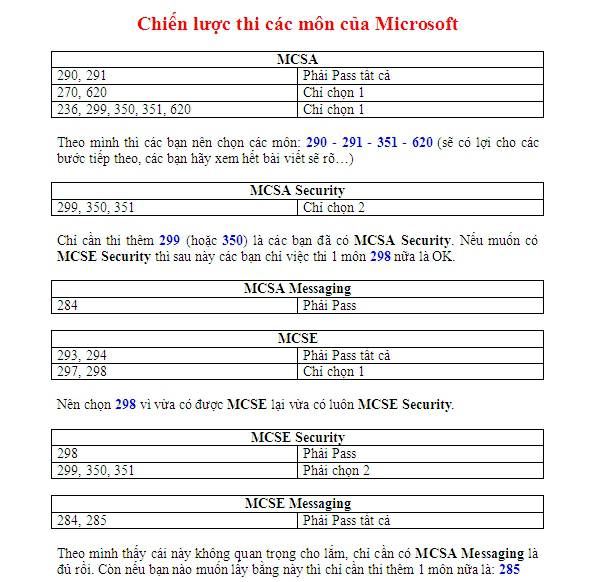
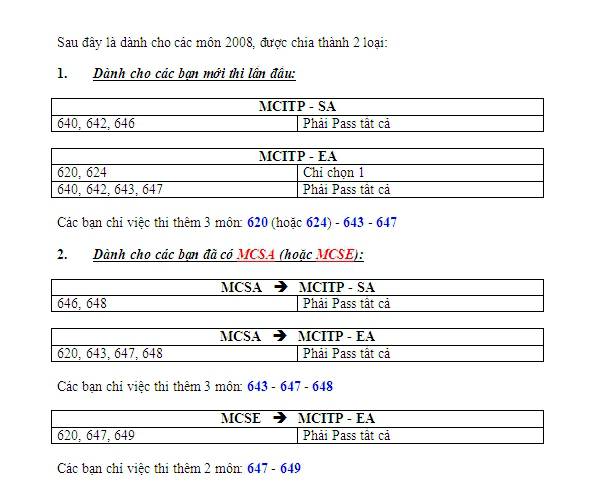
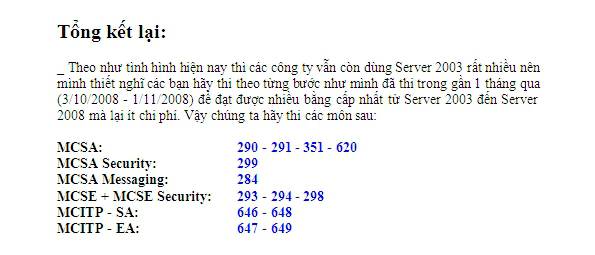
Chiến lược thi các môn Microsoft

Highslide JS

Highslide JS

Highslide JS

Nếu các bạn thi theo đúng "quy trình" như trên, sẽ tiết kiệm được chi phí rất nhiều!cool

p/s: tính post cái này lâu rồi mà chưa rảnh, hôm nay lang thang tìm được mấy tấm ảnh này! Post lên để anh em định hướng đi.

Chiến lược thi các môn Microsoft

On IT
Highslide JS


Highslide JS

Highslide JS

Nếu các bạn thi theo đúng "quy trình" như trên, sẽ tiết kiệm được chi phí rất nhiều! :)

p/s: tính post cái này lâu rồi mà chưa rảnh, hôm nay lang thang tìm được mấy tấm ảnh này! Post lên để anh em định hướng đi.


Copyright by http://www.lecuong.info