test import

Categories

Ad Home

Responsive Ads Here

Labels

642-813 SWITCH (2) 642-902 ROUTE (2) 643-832 TSHOOT (1) Access Based Enumeration (1) access list (2) AIX (1) Anti Malware (16) AutoIT (1) backtrack (4) Basic Networking (3) Blogspot (2) bootable USB (1) can not download attach file from gmail (1) ccna (9) CCNA Lab (19) centos (3) Check (1) Check_MK (3) cisco (51) Dell (1) DHCP (1) Download (2) Dynamic Host Configuration Protocol (1) ebook (2) Ebooks (18) eigrp (1) encapsulation (3) esxi5 (2) exam (13) exchange server 2010 (3) facebook (2) firewall-cmd (1) firewall-config (1) firewalld (1) Frame Relay (4) Free Router Simulator Softwares (1) FreeNAS (1) GhostSurf (1) gns3 (1) Hacking Security (5) hardware (1) hotspot (1) How to Change Windows 2008 R2 SID (1) How to create VPN network on Linux (1) How to install openSSH on AIX 5.3 (1) How to Install the Microsoft Core Fonts on Fedora 19 (1) HP (1) IBM (1) Infrastructure Monitoring (3) InterVLAN (1) ip routing (3) IPSec (2) ipv6 (1) IT (122) joomla (1) Kiến thức (278) LAN Technology (3) life skills for (1) lifeskills (2) linux (13) Linux-Unix (24) mac address (1) Magazine (9) Mail (2) mail server (1) MCSA (7) Microsoft (28) mikrotik (3) Multipoint (1) Nagios (3) NAT (1) nested (1) Network (1) Network Load Balancing (1) News (1) Nghệ thuật sống (1) O365 (4) Office 365 (4) OSPF (1) Packet tracer (19) Pass4sure (1) Point to Point (1) Point-to-Point Protocol (PPP) – CHAP (1) Point-to-Point Protocol (PPP) – PAP (1) Policy (3) Port Security (1) Practice Labs (19) Prerequisites (1) proxy (1) relax (7) rhel7 (1) RIP (1) routerOS (3) Routing (1) SAN (1) SAN Storage (1) Scripts (6) Server (1) server room (1) Sharepoint Server 2007 (1) Sharepoint Server 2010 (1) Spanning Tree Protocol (1) SSH login without password (1) Static Default Route (1) Storage (1) subnet (1) switch (1) System Requirements for Windows Server 2012 (1) Tản mạn (2) tcp-ip (1) telnet (1) TestInside (1) Thư giãn (4) Thủ thuật (2) tip (3) Tips + Tricks (29) trick (1) Tutorial (29) Tutorialvirtual server HighAvailability (1) ubuntu (4) unix (3) Unix-Linux (8) usb (1) Virtual Private Network (VPN) - IPsec (Site-to-Site) (1) Virtual Trunking Protocol (1) Virtualization (2) Virtualization HighAvailability (1) virus (5) vmware (6) vpn (4) vpn client (1) vpn client to site (2) vpn site to site (2) vSphere 5 (6) vSphere 5.1 (1) WAN Technology (13) Warranty (1) wildcard mask (1) windows 7 (1) windows 8 (1) windows server 2008 (3) Windows Server 8 (1)

Facebook

Ethereum

Subscribe for New Post Notifications

Ripple

Ethereum Price

Monday Tuesday Wednesday
$402.89 $384.06 $396.34

Contact Form

Name

Email *

Message *

Bitcoin

Litecoin

Browsing Category " Frame Relay "

CCNA LAB - 4.1 IP Routing - Static and Default Route

CCNA LAB - 4.1 IP Routing - Static and Default Route


LAB 4-1: IP Routing – Static and Default Route


You are the network administrator at Ranet, and have to config the routers both Ranet-HQ and Ranet-BR to make the connection throughout Ranet network and with the Internet. So all you have to do are:

(Config via console of each router.)

1. Enable and set IP address on LAN interface of each router to be the last assignable IP of each subnet.

2. Enable serial interface on each router and set IP address on each interface as:

- s0/0/0 on Ranet-BR: last IP of 52.7.9.220/30
- s0/0/0 on Ranet-HQ: first IP of 52.7.9.220/30
- s0/1/0 on Ranet-HQ: last IP of 77.7.7.252/30
all serial interface use HDLC as encapsulation protocol and do not forget to set clock rate at 64 kbps on Ranet-BR side.

3. Set static route of each LAN on each router to let Host1 connect to Host2. (Use destination interface
instead of IP next hop.)

4. Set default route on each router to let both Host1 and Host2 be able to connect to the Online Server
(72.76.5.3) in the internet.

-------------------------------------- The End ----------------------------------------


Solution:


Ranet-HQ router config:

(copy & paste these commands to Ranet-HQ router)


en
conf t
int fa0/0
no sh
ip add 52.7.9.206 255.255.255.240
int s0/0/0
no sh
ip add 52.7.9.221 255.255.255.252
int s0/1/0
no sh
ip add 77.7.7.254 255.255.255.252
exit
ip route 52.7.9.208 255.255.255.248 se0/0/0
ip route 0.0.0.0 0.0.0.0 se0/1/0


Ranet-HQ#sh ip route 
Codes: C - connected, S - static, I - IGRP, R - RIP, M - mobile, B - BGP
D - EIGRP, EX - EIGRP external, O - OSPF, IA - OSPF inter area
N1 - OSPF NSSA external type 1, N2 - OSPF NSSA external type 2
E1 - OSPF external type 1, E2 - OSPF external type 2, E - EGP
i - IS-IS, L1 - IS-IS level-1, L2 - IS-IS level-2, ia - IS-IS inter area
* - candidate default, U - per-user static route, o - ODR
P - periodic downloaded static route

Gateway of last resort is 0.0.0.0 to network 0.0.0.0

52.0.0.0/28 is subnetted, 1 subnets
C 52.7.9.192 is directly connected, FastEthernet0/0
77.0.0.0/30 is subnetted, 1 subnets
C 77.7.7.252 is directly connected, Serial0/1/0
S* 0.0.0.0/0 is directly connected, Serial0/1/0

Ranet-HQ#copy run start 
Destination filename [startup-config]?
Building configuration...
[OK]
Ranet-HQ#

Ranet-BR router config:
(copy & paste these commands to Ranet-BR router)
en
conf t
int fa0/0
no sh
ip add 52.7.9.214 255.255.255.248
int s0/0/0
no sh
clock rate 64000
ip add 52.7.9.222 255.255.255.252
exit
ip route 52.7.9.192 255.255.255.240 s0/0/0
ip route 0.0.0.0 0.0.0.0 se0/0/0
end


Ranet-BR#sh ip route

Codes: C - connected, S - static, I - IGRP, R - RIP, M - mobile, B - BGP

D - EIGRP, EX - EIGRP external, O - OSPF, IA - OSPF inter area

N1 - OSPF NSSA external type 1, N2 - OSPF NSSA external type 2

E1 - OSPF external type 1, E2 - OSPF external type 2, E - EGP

i - IS-IS, L1 - IS-IS level-1, L2 - IS-IS level-2, ia - IS-IS inter area

* - candidate default, U - per-user static route, o - ODR

P - periodic downloaded static route


Gateway of last resort is 0.0.0.0 to network 0.0.0.0


52.0.0.0/8 is variably subnetted, 3 subnets, 3 masks

S 52.7.9.192/28 is directly connected, Serial0/0/0

C 52.7.9.208/29 is directly connected, FastEthernet0/0

C 52.7.9.220/30 is directly connected, Serial0/0/0

S* 0.0.0.0/0 is directly connected, Serial0/0/0

Ranet-BR#copy run start 

Destination filename [startup-config]?

Building configuration...

[OK]

Ranet-BR#


Now, everything is ok!!


------------------------------ The End --------------------------


You can download this solution here.


Copyright by http://www.lecuong.info

CCNA LAB- 3.4 Frame Relay - Point to Point

CCNA LAB- 3.4 Frame Relay - Point to Point


LAB 3-4: Frame Relay – Point-to-Point (Subinterface)

You are the network administrator at Ranet Headquater, and have to configure the router “Ranet-HQ” to let Host1 connect with Host2, Host3 and Host4 as below:
(Use console to config this router.)

1. Enable and set IP address on LAN interface to be the first IP of this subnet.

2. Enable serial interface, and create subinterface with Frame-Relay setting as below:

- s0/0/0.2 for connect with Ranet-BR2, via DLCI 902
- s0/0/0.3 for connect with Ranet-BR3, via DLCI 903
- s0/0/0.4 for connect with Ranet-BR4, via DLCI 904

All subinterfaces use CISCO standard for both encapsulation and LMI, and set IP address to use the first IP in each subnet.

If everything is correct, Host1 should be able to connect
with Host2, Host3, and Host4.
Solution:


Ranet-HQ config:
(copy & paste these commands to Ranet-HQ router)
en
conf t
int fa0/0
no sh
ip add 172.20.8.1 255.255.255.240
int s0/0/0
no sh
encapsulation frame-relay
int s0/0/0.2 point-to-point
frame-relay interface-dlci 902
ip add 10.0.2.1 255.255.255.252
int s0/0/0.3 point-to-point
frame-relay interface-dlci 903
ip add 10.0.3.1 255.255.255.252
int s0/0/0.4 point-to-point
frame-relay interface-dlci 904
ip add 10.0.4.1 255.255.255.252
end

Ranet-HQ#sh frame-relay map
Serial0/0/0.2 (up): point-to-point dlci, dlci 902, broadcast, status defined, active
Serial0/0/0.3 (up): point-to-point dlci, dlci 903, broadcast, status defined, active
Serial0/0/0.4 (up): point-to-point dlci, dlci 904, broadcast, status defined, active

Ranet-HQ#ping 172.20.8.30
Type escape sequence to abort.
Sending 5, 100-byte ICMP Echos to 172.20.8.30, timeout is 2 seconds:
.!!!!
Success rate is 80 percent (4/5), round-trip min/avg/max = 4/9/12 ms
Ranet-HQ#ping 172.20.8.40
Type escape sequence to abort.
Sending 5, 100-byte ICMP Echos to 172.20.8.40, timeout is 2 seconds:
.!!!!
Success rate is 80 percent (4/5), round-trip min/avg/max = 10/12/16 ms
Ranet-HQ#ping 172.20.8.60
Type escape sequence to abort.
Sending 5, 100-byte ICMP Echos to 172.20.8.60, timeout is 2 seconds:
.!!!!
Success rate is 80 percent (4/5), round-trip min/avg/max = 11/12/13 ms
Ranet-HQ#copy run start
Destination filename [startup-config]?
Building configuration...
[OK]
Ranet-HQ#

Everthing is ok!! Host1 should be able to connect with Host2, Host3, and Host4.

----------------------------------------  End -------------------------------------

You can download this solution here.
Copyright by http://www.lecuong.info

CCNA LAB - 3.3 Frame Relay – Multipoint

CCNA LAB - 3.3 Frame Relay – Multipoint


LAB 3-3: Frame Relay – Multipoint

You are the network administrator at Ranet Headquater, and have to configure the router “Ranet-HQ” to let Host1connect with Host2, Host3 and Host4 as below:
(Use console to config this router.)

1. Enable and set IP address on LAN interface to be the first IP of this subnet.

2. Enable and set IP address on serial interface to be the first IP of its subnet, and then set the parameter about frame-relay as:
- Use IETF Frame-Relay as encapsulation protocol
- Use LMI ANSI type then try to ping with others node in this subnet, and use command to gather information about DLCI per each destination that came from Inverse-ARP then shutdown this interface and set frame-relay map in static, after that, re-enable the interface and check the
connections between node again.

If success, Host1 should be able to connect with other Hosts.


------------------------- The End ------------------------------Solution


Ranet-HQ config:
(copy & paste these commands to Ranet-HQ router)


en
conf t
int fa0/0
no shut
ip add 192.168.0.73 255.255.255.248
int s0/0/0
no shut
ip add 10.0.0.1 255.255.255.248
encapsulation frame-relay ietf
frame-relay lmi-type ansi
end

Ranet-HQ#ping 192.168.0.123
Type escape sequence to abort.
Sending 5, 100-byte ICMP Echos to 192.168.0.123, timeout is 2 seconds:
.!!!!
Success rate is 80 percent (4/5), round-trip min/avg/max = 11/12/13 ms
Ranet-HQ#sh frame-relay map
Serial0/0/0 (up): ip 10.0.0.4 dlci 104, dynamic, broadcast, IETF, status defined, active
Serial0/0/0 (up): ip 10.0.0.2 dlci 102, dynamic, broadcast, IETF, status defined, active
Serial0/0/0 (up): ip 10.0.0.3 dlci 103, dynamic, broadcast, IETF, status defined, active

(copy & paste these commands below)
conf t
int s0/0/0
sh
frame-relay map ip 10.0.0.2 102 broadcast
frame-relay map ip 10.0.0.3 103 broadcast
frame-relay map ip 10.0.0.4 104 broadcast
no sh

Ranet-HQ#sh frame-relay map
Serial0/0/0 (up): ip 10.0.0.2 dlci 102, static, broadcast, IETF, status defined, active
Serial0/0/0 (up): ip 10.0.0.3 dlci 103, static, broadcast, IETF, status defined, active
Serial0/0/0 (up): ip 10.0.0.4 dlci 104, static, broadcast, IETF, status defined, active
Ranet-HQ#ping 192.168.0.123
Type escape sequence to abort.
Sending 5, 100-byte ICMP Echos to 192.168.0.123, timeout is 2 seconds:
!!!!!
Success rate is 100 percent (5/5), round-trip min/avg/max = 9/12/15 ms
Ranet-HQ#ping 192.168.0.130
Type escape sequence to abort.
Sending 5, 100-byte ICMP Echos to 192.168.0.130, timeout is 2 seconds:
.!!!!
Success rate is 80 percent (4/5), round-trip min/avg/max = 10/12/15 ms
Ranet-HQ#ping 192.168.0.140
Type escape sequence to abort.
Sending 5, 100-byte ICMP Echos to 192.168.0.140, timeout is 2 seconds:
.!!!!
Success rate is 80 percent (4/5), round-trip min/avg/max = 11/12/15 ms
Ranet-HQ#copy run start
Destination filename [startup-config]?
Building configuration...
[OK]
Ranet-HQ#

Host1 :

(Desktop > Command Prompt)
Packet Tracer PC Command Line 1.0
PC>ping 192.168.0.123
Pinging 192.168.0.123 with 32 bytes of data:
Reply from 192.168.0.123: bytes=32 time=23ms TTL=126
Reply from 192.168.0.123: bytes=32 time=16ms TTL=126
Reply from 192.168.0.123: bytes=32 time=17ms TTL=126
Ping statistics for 192.168.0.123:
Packets: Sent = 4, Received = 4, Lost = 0 (0% loss),
Approximate round trip times in milli-seconds:
Minimum = 16ms, Maximum = 23ms, Average = 18ms
PC>ping 192.168.0.130
Pinging 192.168.0.130 with 32 bytes of data:
Reply from 192.168.0.130: bytes=32 time=14ms TTL=126
Reply from 192.168.0.130: bytes=32 time=16ms TTL=126
Reply from 192.168.0.130: bytes=32 time=19ms TTL=126
Reply from 192.168.0.130: bytes=32 time=18ms TTL=126
Ping statistics for 192.168.0.130:
Packets: Sent = 4, Received = 4, Lost = 0 (0% loss),
Approximate round trip times in milli-seconds:
Minimum = 14ms, Maximum = 19ms, Average = 16ms

PC>ping 192.168.0.140
Pinging 192.168.0.140 with 32 bytes of data:
Reply from 192.168.0.140: bytes=32 time=17ms TTL=126
Reply from 192.168.0.140: bytes=32 time=8ms TTL=126
Reply from 192.168.0.140: bytes=32 time=18ms TTL=126
Reply from 192.168.0.140: bytes=32 time=15ms TTL=126
Ping statistics for 192.168.0.140:
Packets: Sent = 4, Received = 4, Lost = 0 (0% loss),
Approximate round trip times in milli-seconds:
Minimum = 8ms, Maximum = 18ms, Average = 14ms
PC>


----------------------------------------  End -------------------------------------

You can download this solution here.
Copyright by http://www.lecuong.info

Frame relay basic

Frame relay basic
On cisco
CẤU HÌNH FRAME-RELAY CƠ BẢN

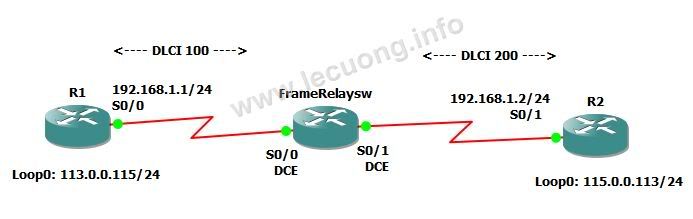
1.Mô hình bài lab như sau:


Router FrameRelaysw được cấu hình trở thành một frame relay switch.

2. Cấu hình


Thực hiện trên router R1:
- Cấu hình hostname, ip :

Router>en
Router#conf t
Router(config)#hostname R1
R1(config)#int loop 0
R1(config-if)#ip add 113.0.0.115 255.255.255.0
R1(config-if)#no shut
R1(config-if)#int s 0/0
R1(config-if)#ip add 192.168.1.1 255.255.255.0
R1(config-if)#no shut
R1(config-if)#exit
R1(config)#router rip
R1(config-router)#net 192.168.1.0
R1(config-router)#net 113.0.0.0
R1(config-router)#exit

-Cấu hinh frame-relay

R1(config)#int s0/0
R1(config-if)#encapsulation frame-relay    //Sử dụng giao thức đóng gói
R1(config-if)#frame-relay lmi-type ansi     //Cấu hình kiểu của LMI là ANSI
R1(config-if)#end

Thực hiện trên router R2:
- Cấu hình hostname, ip :
Router>en
Router#conf t
Router(config)#hostname R2
R2(config)#int loop 0
R2(config-if)#ip add 113.0.0.115 255.255.255.0
R2(config-if)#no shut
R2(config-if)#int s 0/0
R2(config-if)#ip add 192.168.1.1 255.255.255.0
R2(config-if)#no shut
R2(config-if)#exit
R2(config)#router rip
R2(config-router)#net 192.168.1.0
R2(config-router)#net 113.0.0.0
exit

-Cấu hinh frame-relay

R2(config)#int s0/0
R2(config-if)#encapsulation frame-relay //Sử dụng giao thức đóng gói
R2(config-if)#frame-relay lmi-type ansi //Cấu hình kiểu của LMI là ANSI
R2(config-if)#end

Thực hiện trên router FrameRelaysw:

Router>en
Router#conf t
Router(config)#hostname FrameRelaysw
FrameRelaysw(config)#frame-relay switching  //Cấu hình cho router trở thành một Frame Relay Switch
FrameRelaysw(config)#int s0/0
FrameRelaysw(config-if)#encapsulation frame-relay
FrameRelaysw(config-if)#frame-relay lmi-type ansi
FrameRelaysw(config-if)#frame-relay intf-type dce
FrameRelaysw(config-if)#clock rate 64000
FrameRelaysw(config-if)#frame-relay route 100 int s0/1 200 //bất kỳ một frame relay traffic nào có DLCI là 100 đến interface serial0/0 của router sẽ được gửi ra interface serial0/1 với DLCI là 200.

FrameRelaysw(config-if)#no shut
FrameRelaysw(config)#int s0/1
FrameRelaysw(config-if)#encapsulation frame-relay
FrameRelaysw(config-if)#frame-relay lmi-type ansi
FrameRelaysw(config-if)#frame-relay intf-type dce
FrameRelaysw(config-if)#clock rate 64000
FrameRelaysw(config-if)#frame-relay route 200 int s0/0 100 //bất kỳ một frame relay traffic nào có DLCI là 100 đến interface serial0/0 của router sẽ được gửi ra interface serial0/1 với DLCI là 200.

FrameRelaysw(config-if)#no shut

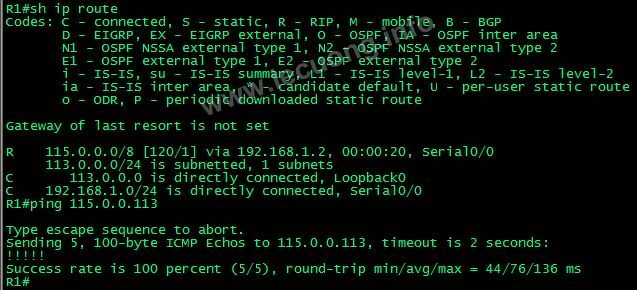
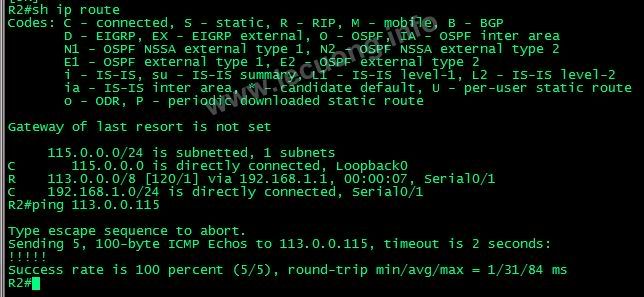
3.Kết quả:

Các router R1, R2 đã học đươc network của nhau, các mạng đã có thể liên lạc với nhau.

Ping từ R1 đến loopback trên R2 thành công!!


Ping từ R2 đến loopback trên R1 thành công!!


Một số lệnh kiểm tra cấu hình :

- show frame-relay pvc //kiểm tra hoạt động của frame relay switch

- show frame lmi //kiểm tra tình trạng của LMI giữa router FrameRelaysw và hai router R1,R2

-show frame-relay route //kiểm tra các frame relay route trên router FrameRelaysw

-show frame-relay map //kiểm tra map địa chỉ IP đầu xa của PVC với DLCI của interface đầu gần

---

Good luck!


Copyright by http://www.lecuong.info